

Hey all, I was trying to troubleshoot an A/C issue with my Accord and had trouble getting access to the Electronic Service Manual - many dead links, old tutorials with deleted pictures, etc. I thought I would make a thread detailing how I got it to work to save anyone else in the future the trouble. All you need is a laptop/pc.
In case you don't know, the Honda ESM is a resource that was used by Honda mechanics to service, troubleshoot, and repair basically every aspect of these cars. It gives you step-by-step instructions with detailed diagrams on whatever job you're planning on doing that you could have got done at the main dealer.
Step 1 - Download and extract the ESM files
Download the files from one of the below links, and extract them. If you do not know how to extract .rar files, just google "How to extract a .rar (your windows version)".
https://disk.yandex.com/d/U4q6mRR1b8AjR - Courtesy of btjtaylor, this is the original download link I downloaded the files from.
https://files.catbox.moe/8prkfw.rar - This is my own reupload the files for longevity
IF ONE OF THESE LINKS DON'T WORK, PLS REUPLOAD THE FILES ON ANOTHER FILEHOST AND POST AN UPDATED LINK IN THE COMMENTS
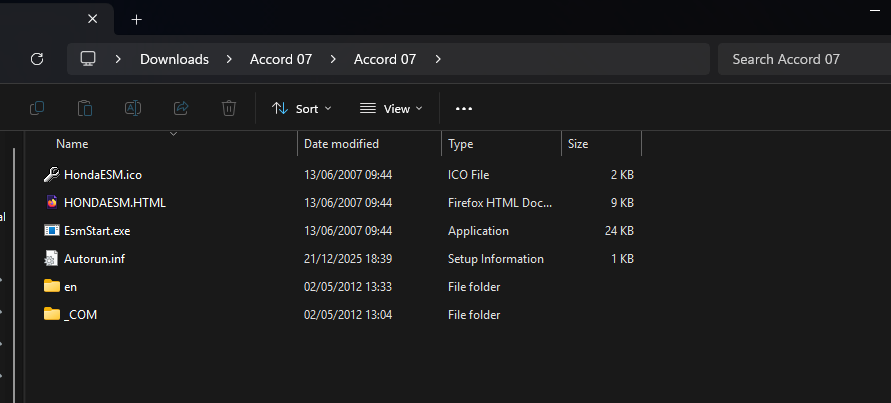
Once extracted, open the folder, open the "Accord 07" folder, and you should see different files named "EsmStart.exe", "HONDAESM.HTML", etc. It should look like the below image. Do not proceed to step 2 until you have found these files.
Step 2 - Set up Internet Explorer
Microsoft has discontinued Internet Explorer, which is bad as the ESM only appears to work on it. Luckily there is a workaround to get Internet Explorer working again on Windows 11. Firstly, open Notepad. Secondly, copy and paste this line of code " CreateObject("InternetExplorer.Application").Visible=true " - then, save the file as whatever name you want, but make sure it ends with ".vbs", for example "Internet Explorer.vbs" - THE .vbs PART IS VERY IMPORTANT. Double click to run the file, and it should open Internet Explorer. If you need a bit more help with this, there are lots of YouTube tutorials covering many different methods on how to access Internet Explorer in 2025, such as THIS one. While this method works in December 2025, I cannot guarantee this method will remain viable forever, so if it does not work you will need to research yourself for more up-to-date solutions.
Step 3 - Running the ESM
Now you have everything you need. Run the "Internet Explorer.vbs" file (If this does not work, right click it, click "open with", and click "Microsoft windows based script host". This will open Internet Explorer. Then, go into the ESM folder, and locate the "HONDAESM.HTML" file. Drag and drop this file into the Internet Explorer window. This will open a prompt saying "Execute the Microsoft Internet Explorer(R)" - click "OK". Another box will pop up saying "The webpage you are viewing is trying to close the window, do you want to close the window?" - click "No". The ESM will then start running. The Internet Explorer window may collapse into a small box in the corner of your screen, you can make it bigger by clicking the fullscreen button or by dragging on the window edges to make it your desired size.
You should then be met with this menu:
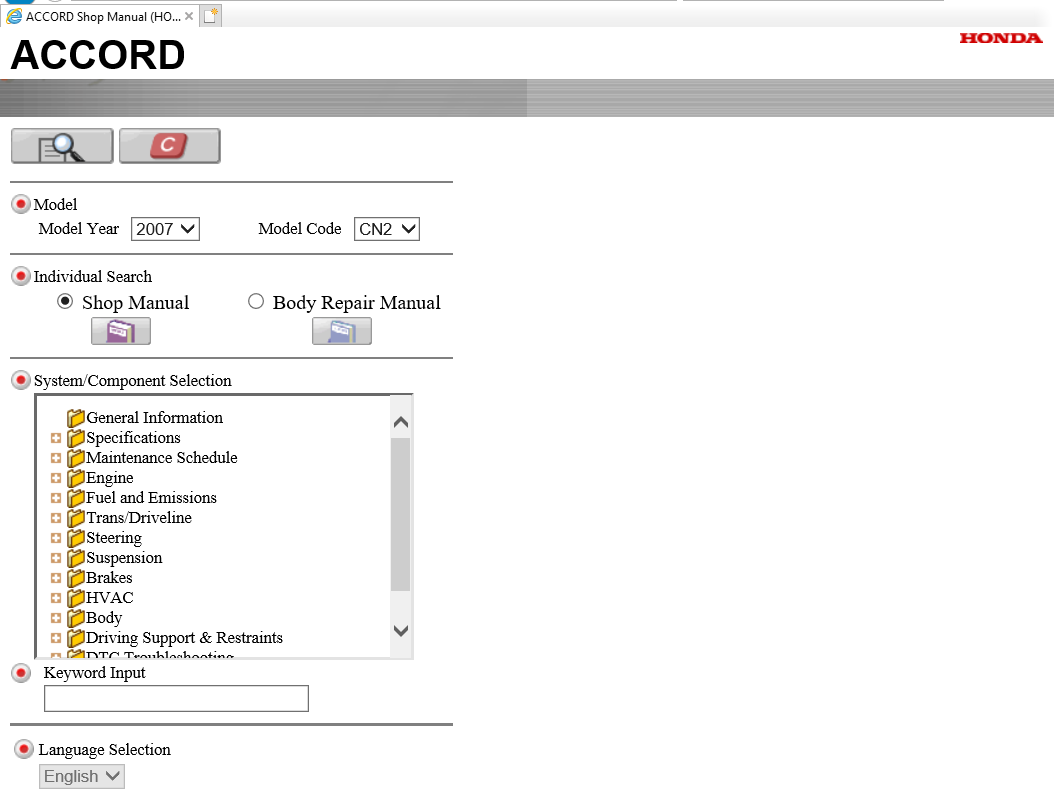
Input your cars year and model code. Click on either "Shop Manual" or "Body Repair Manual" depending on what you need advice for. In the section labelled "System/Component selection" you will see a list of systems and components. When you find your desired folder (You can get more precise by clicking the + button next to the file icons", click on the file image so it changes to an open file. Then click the magnifying glass on the top left of the page, and it will open a list of tutorials and resources relating to that part. Click your desired tutorial, and it will open in a new page. You can click on images to zoom in on them for easier reading.
I hope this helps many people with their DIY and troubleshooting projects
In case you don't know, the Honda ESM is a resource that was used by Honda mechanics to service, troubleshoot, and repair basically every aspect of these cars. It gives you step-by-step instructions with detailed diagrams on whatever job you're planning on doing that you could have got done at the main dealer.
Step 1 - Download and extract the ESM files
Download the files from one of the below links, and extract them. If you do not know how to extract .rar files, just google "How to extract a .rar (your windows version)".
https://disk.yandex.com/d/U4q6mRR1b8AjR - Courtesy of btjtaylor, this is the original download link I downloaded the files from.
https://files.catbox.moe/8prkfw.rar - This is my own reupload the files for longevity
IF ONE OF THESE LINKS DON'T WORK, PLS REUPLOAD THE FILES ON ANOTHER FILEHOST AND POST AN UPDATED LINK IN THE COMMENTS
Once extracted, open the folder, open the "Accord 07" folder, and you should see different files named "EsmStart.exe", "HONDAESM.HTML", etc. It should look like the below image. Do not proceed to step 2 until you have found these files.
Step 2 - Set up Internet Explorer
Microsoft has discontinued Internet Explorer, which is bad as the ESM only appears to work on it. Luckily there is a workaround to get Internet Explorer working again on Windows 11. Firstly, open Notepad. Secondly, copy and paste this line of code " CreateObject("InternetExplorer.Application").Visible=true " - then, save the file as whatever name you want, but make sure it ends with ".vbs", for example "Internet Explorer.vbs" - THE .vbs PART IS VERY IMPORTANT. Double click to run the file, and it should open Internet Explorer. If you need a bit more help with this, there are lots of YouTube tutorials covering many different methods on how to access Internet Explorer in 2025, such as THIS one. While this method works in December 2025, I cannot guarantee this method will remain viable forever, so if it does not work you will need to research yourself for more up-to-date solutions.
Step 3 - Running the ESM
Now you have everything you need. Run the "Internet Explorer.vbs" file (If this does not work, right click it, click "open with", and click "Microsoft windows based script host". This will open Internet Explorer. Then, go into the ESM folder, and locate the "HONDAESM.HTML" file. Drag and drop this file into the Internet Explorer window. This will open a prompt saying "Execute the Microsoft Internet Explorer(R)" - click "OK". Another box will pop up saying "The webpage you are viewing is trying to close the window, do you want to close the window?" - click "No". The ESM will then start running. The Internet Explorer window may collapse into a small box in the corner of your screen, you can make it bigger by clicking the fullscreen button or by dragging on the window edges to make it your desired size.
You should then be met with this menu:
Input your cars year and model code. Click on either "Shop Manual" or "Body Repair Manual" depending on what you need advice for. In the section labelled "System/Component selection" you will see a list of systems and components. When you find your desired folder (You can get more precise by clicking the + button next to the file icons", click on the file image so it changes to an open file. Then click the magnifying glass on the top left of the page, and it will open a list of tutorials and resources relating to that part. Click your desired tutorial, and it will open in a new page. You can click on images to zoom in on them for easier reading.
I hope this helps many people with their DIY and troubleshooting projects